Office Space Planning Software: A Guide for Your Business


A lot of Logan County business owners reach the same point at roughly the same time. The team has grown, the office hasn't kept up, and the layout that once felt fine now creates friction every day. One corner is too loud, another sits empty, and nobody feels quite sure whether the business needs more desks, fewer desks, or just a better plan.
That's where office space planning software starts to make sense. It gives a business a practical way to map the space, test ideas, and make decisions before ordering furniture or moving walls. For a family business that has helped local customers furnish homes since 1946 and support design decisions since 1964, that kind of careful planning feels familiar. It's the same common-sense approach used when helping a family choose a custom sofa, a better bedroom layout, or even a reliable appliance purchase like Speed Queen laundry. Measure first, plan well, then buy with confidence.
Table of Contents
- Your Guide to Smarter Office Design
- What Is Office Space Planning Software
- Three Main Types of Planning Tools
- How to Choose the Right Software for Your Business
- A Practical Workflow for Local Businesses
- Bringing Your Plan to Life with a Local Partner
Your Guide to Smarter Office Design
A Bellefontaine business owner might start with a simple complaint from staff. There aren't enough good spots for focused work on Tuesday, yet several desks stay empty later in the week. The conference room feels crowded for one meeting, then unused for two days. Nothing is fully broken, but nothing feels well matched either.
That tension has become more common because office space carries more pressure than it used to. A recent industry report noted that 75% of businesses planned to reduce office square footage in the coming year according to the 2023 office space report. When every square foot matters more, guessing gets expensive.
Practical rule: A smaller office doesn't automatically mean a worse office. It often means the layout has to work harder.
That's why many owners now start with planning software instead of starting with furniture catalogs. The software helps answer basic but important questions. How many people are in the office on the busiest day? Which rooms are overused? Which areas look useful on paper but don't support the way the team works?
For owners who want a simple outside perspective before diving in, the Virtual Tour Easy design guide offers a helpful look at office planning basics. Local businesses can also compare those ideas with practical office furniture layout ideas that focus on how a finished workplace needs to function in real life, not just on a screen.
Why this matters in Logan County
Many smaller and mid-sized companies don't have a workplace strategist on staff. The owner, office manager, or operations lead often wears that hat. Office space planning software helps that person move from hunches to visible options.
The value is straightforward:
- It reduces second-guessing. A team can test layouts before moving people or placing orders.
- It improves conversations. Staff, leadership, and furniture partners can react to the same visual plan.
- It protects the budget. Better planning lowers the risk of buying pieces that don't fit the room or the workflow.
That's the same mindset local shoppers bring when they compare Bellefontaine furniture for a home project, or when a family visits a mattress store in Logan County and wants to get the size, support, and room setup right the first time.
What Is Office Space Planning Software
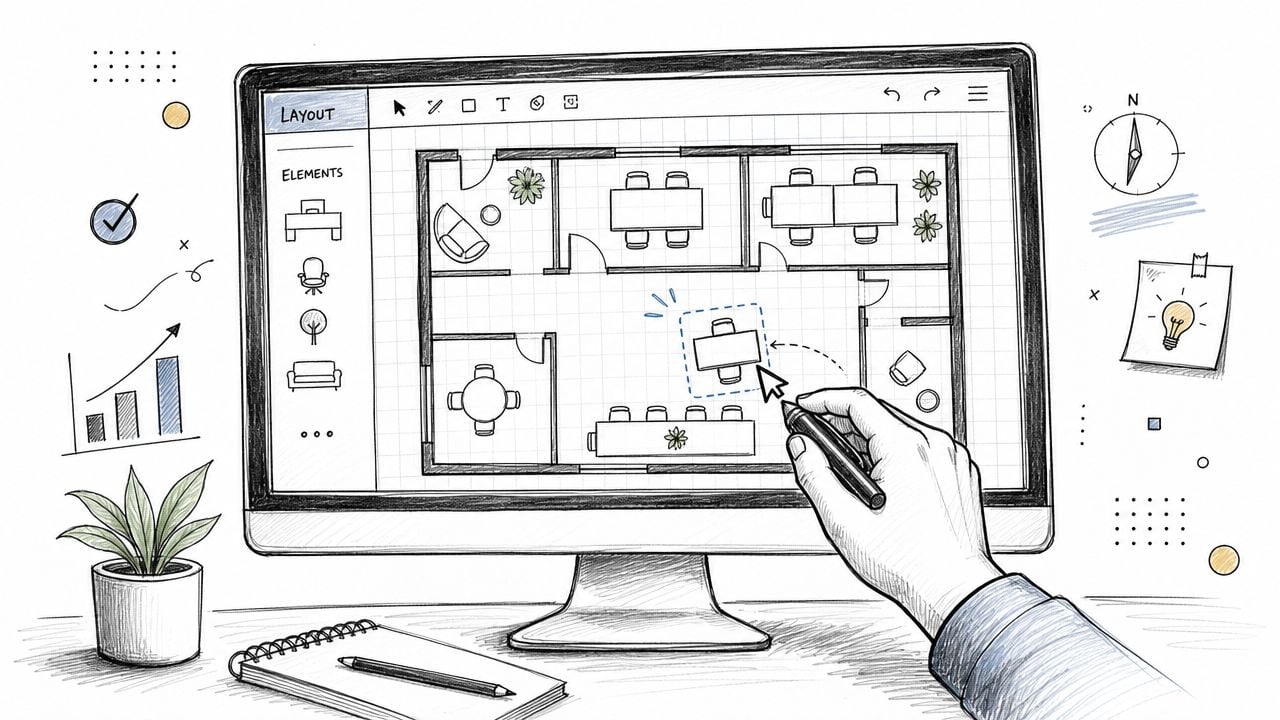
Office space planning software is a digital tool that helps a business draw its office, place furniture, organize work areas, and adjust the layout before anything gets moved in real life. In plain terms, it's the office version of a home blueprint.
A simple way to think about it
When a family plans a remodel, they usually don't carry a sofa into the room five different times just to see if it fits. They sketch, measure, compare, and narrow the options first. Office planning software does that same job for workplaces, only with desks, private offices, shared tables, traffic paths, and meeting spaces.
A basic setup often lets a business:
- Map the room dimensions
- Place desks, tables, and storage
- Test different seating arrangements
- See how people will move through the space
- Share the layout with decision-makers
For business owners who want a quick foundation, this short guide on what space planning means gives useful background before software enters the picture.
Why businesses started paying attention
The software category became important because many offices weren't using space the way owners assumed. According to Matterport's overview of office space planning metrics, traditional assigned-seat offices typically run at only 55% to 70% average occupancy, with peak occupancy below 85%. That gap explains why so many companies started measuring actual use rather than assuming every desk was needed every day.
That same source explains key terms that often confuse first-time buyers:
- Utilization rate means actual hours used divided by total available hours, multiplied by 100.
- Occupancy rate means occupied seats divided by total seats, also expressed as a percentage.
- Peak occupancy shows the busiest point, not the average day.
- Booking-to-show rate helps reveal whether reservations turn into real use.
A floor plan can look full on paper and still waste money in practice.
That's the difference between drawing a room and understanding a workplace. Static layouts show where furniture could go. Office space planning software helps show whether the setup matches how people work.
For a Logan County owner, that's practical value, not tech jargon. It helps answer whether the business needs more private offices, fewer assigned desks, or a different mix altogether. It also makes furniture conversations more productive, especially when selecting durable pieces for day-to-day use, much like choosing custom sofas in Ohio where fit, fabric, and function all matter at once.
Three Main Types of Planning Tools
A good way to sort office planning software is by the job it needs to do. Some tools help you sketch a room and test furniture placement. Some create detailed documents for construction. Others help you manage the space after people start using it.
That difference matters for a Logan County business owner because the output affects who can act on it. A rough layout can start a furniture conversation. A technical drawing can guide a contractor. A live management system can help your team adjust seating and room use over time.
Comparison of Office Planning Tool Types
| Tool Type | Best For | Typical Cost | Learning Curve |
|---|---|---|---|
| Simple layout tools | Owners and managers who need a visual plan | Varies by provider | Low |
| Technical drafting tools | Architects, contractors, and detailed build-outs | Usually higher than basic tools | High |
| Live workplace management tools | Hybrid offices that need ongoing updates | Varies by provider and features | Medium |
Simple layout tools
Simple layout tools work a lot like arranging furniture on graph paper before you move anything heavy. You enter room dimensions, drop in desks or tables, and test different setups.
For many small businesses, that is enough to answer the first round of questions:
- How many workstations fit comfortably?
- Is there enough walking space between desks?
- Would a larger conference table make the room feel cramped?
- Can the front office, break area, and private work zones coexist without crowding each other?
These tools are useful early because they turn vague ideas into something visible. That makes it easier to sit down with a local furniture partner and discuss real pieces, real sizes, and real traffic flow instead of guessing from memory.
Their weakness is simple. They usually stop at layout. They help you see where furniture could go, but they often do not help much with ongoing scheduling, seat sharing, or changes in day-to-day use.
Technical drafting tools
Technical drafting tools are built for precision. If simple layout software is like sketching a kitchen remodel on paper, technical drafting is the full set of measurements a builder uses to cut materials and place outlets in the right spot.
This category makes sense when a project includes:
- custom built-ins or millwork
- moving walls or doors
- electrical and data coordination
- permit drawings or contractor documentation
A growing business sometimes needs this level of detail, especially during a major renovation. But many owners do not need to learn this software themselves. They just need to understand what it produces and how that output connects to furniture planning. A detailed plan can show whether a reception desk fits the wall correctly, whether storage interferes with door swings, or whether private offices still leave enough open circulation.
Live workplace management tools
Live workplace management tools focus on what happens after the office opens. They combine floor plans with day-to-day use, so the plan stays useful instead of becoming a static file no one revisits.
That matters most for teams with rotating schedules, shared desks, or meeting rooms that stay busy one week and sit empty the next. In practical terms, these tools often include:
- Interactive maps: Staff can find desks, rooms, and departments quickly.
- Booking functions: Teams reserve spaces before they arrive.
- Usage tracking: Managers can review patterns such as no-shows or underused areas.
- Integrations: Shared calendars and employee data help keep assignments current.
For a local business, the practical question is not which category sounds most advanced. It is which category gives you an output you can use. If you are planning a one-time office refresh, a simple visual planner may be enough. If you are remodeling walls and power locations, technical drawings may be necessary. If your office changes week to week, live management features may save time and reduce confusion.
The best planning tool is the one that produces a plan your team can understand and your local partners can build from.
If you are still working out what your space needs before choosing software, these small office layout ideas for tighter workspaces can help you decide how much planning detail you need.
How to Choose the Right Software for Your Business

A Logan County owner often reaches the software decision at a busy point in the project. The lease is signed or close to signed. Staff have opinions. The office manager needs answers. The software starts to look like the place to solve everything at once.
That is usually where overspending happens.
Office space planning software works a lot like drawing up a kitchen remodel at home. A polished app can show beautiful cabinets and clean lines, but the ultimate test is whether the measurements, traffic flow, and final shopping list help you buy the right pieces and install them without surprises. For a business here, the best software is the one that gives your team a clear plan and gives your furniture partner something useful to work from.
Start with the job the software needs to do
Before looking at features, decide what role the software will play in your project.
Some businesses need a simple planning tool for one move or renovation. Others need something staff will keep using after move-in to manage seats, rooms, and changes over time. Those are two different jobs, and buying for the wrong one can waste money fast.
A good first filter is practical:
- Project type: Are you laying out a new office, adjusting an existing one, or managing space every week?
- People using it: Will only one manager touch the software, or will several employees need access?
- Output quality: Can you print, export, or share drawings in a way a contractor, installer, or furniture team can use?
- Ease of changes: If headcount shifts or a department moves, can someone update the plan without starting from scratch?
- Readability: Can a non-technical person look at the plan and understand where people, storage, and shared areas belong?
That last point gets overlooked. A confusing floor plan slows down decisions, even if the software itself is powerful.
Choose software that matches your buying process
Business owners sometimes shop for software as if the software is the final product. It is not. It is a planning tool inside a larger project that may also include flooring, power access, privacy needs, delivery timing, installation, and furniture selection.
That means the output matters as much as the interface.
If the program creates a plan your local partners can measure from, price from, and furnish from, it is doing its job. If it only creates a nice screen view, you may still end up reworking the layout later with someone else. That adds time, and it can add cost.
For many local companies, it helps to review software options alongside office space planning services for Logan County businesses so the plan on screen lines up with real furniture sizes, walkways, storage needs, and installation requirements.
Questions worth asking before you pay
A short checklist can keep the decision grounded:
- Who will maintain the plan after setup? If one office manager owns it, simpler is usually better.
- How often will the office change? A stable layout needs different software than a team with shifting schedules or shared desks.
- What will you do with the final file? Your mover, contractor, and furniture partner may need specific views or measurements.
- Does the tool help with real decisions? You should be able to test desk counts, meeting space, traffic paths, and storage placement.
- How does it fit the full project budget? Software is only one line item. Furniture, delivery, setup, and future changes matter too.
A useful rule is this. Do not pay for features your business will never use, and do not settle for a tool that leaves your local partners guessing.
That approach fits how many families and business owners around here already buy for their homes and offices. They want a plan that makes sense, lasts, and leads to a finished space that works in daily life. Your software should support that outcome, not turn a straightforward office project into a tech project.
A Practical Workflow for Local Businesses
A good plan doesn't begin with furniture. It begins with attendance, tasks, and the busiest day.
A simple planning example
Modern guidance suggests planning around peak-day attendance instead of total headcount. In one example from the earlier-cited industry guidance, if 200 employees have a busiest-day attendance of 60%, planners should expect 120 people, then add a 10% to 15% buffer for a target of roughly 135 to 140 desks. That same guidance also suggests allocating about 60% of total square footage to workstations and 40% to meeting rooms, collaboration areas, and support spaces. For this article, that benchmark is referenced as noted earlier in the guide.
A Logan County business can use that same logic without copying the exact numbers. If a team of 50 only sees its highest attendance on certain days, the layout should reflect that actual pattern, not a full-roster assumption.
A practical workflow often looks like this:
- List the people who use the office most often. Separate daily users from occasional users.
- Mark the busiest days. The office should be designed for real pressure points.
- Sort work by activity. Quiet tasks, calls, teamwork, waiting areas, and storage all need different kinds of space.
- Create a first draft in software. Add desks, circulation paths, and shared areas.
- Review the draft with a furnishing partner. That's where dimensions, durability, and finish choices come into focus.
A layout should support behavior, not force people into a picture that looked good on a screen.
What a review-ready draft should include
Before a business sends a plan out for furniture recommendations or installation pricing, the draft should show enough detail to be useful.
That usually includes:
- Room dimensions
- Door swings and major windows
- Desk counts by area
- Meeting spaces and support zones
- Traffic paths
- Any known storage or reception needs
For businesses ready to move from rough idea to professional review, these office space planning services show what a more refined next step can look like.
At that point, the software has done its job. It has turned uncertainty into something visible and workable.
Bringing Your Plan to Life with a Local Partner
A floor plan on a screen is a good start. A workable office takes one more step. Someone has to turn that drawing into real desks, real clearances, real seating, and a room your staff can use on Monday morning without surprises.
That handoff is where many projects get stuck. The software may show a neat row of workstations, but the actual room may have a tight doorway, a column that steals space, or a reception area that needs more storage than anyone expected. For a Logan County business owner, that gap matters because it affects budget, timing, and how well the office works day to day.
Why a local review matters
Software helps you see the layout. A local partner helps you test whether the layout will hold up in real use.
A good comparison is a kitchen sketch for a home remodel. The drawing helps you decide where the cabinets and table should go. The installer then checks walls, measurements, traffic flow, and how the family uses the room. Office planning works the same way.
A local furnishing partner can help with:
- Checking fit: Making sure desks, seating, and storage match the room you have
- Matching furniture to work style: Choosing pieces that support phone calls, focused work, meetings, waiting areas, or shared touchdown space
- Catching field issues early: Spotting narrow clearances, awkward corners, or installation concerns before furniture arrives
- Coordinating delivery and setup: Getting the room furnished correctly instead of leaving your staff to sort out boxes and placement
- Planning for change: Leaving room for growth, shifting team sizes, or new storage needs later
That last point is easy to miss. A plan that works only on move-in day is not much of a plan.
Tanger's Furniture provides commercial office furniture supplier support that helps connect the software draft to product selection, installation planning, and day-to-day practicality. That matters because the actual goal is not just a nice drawing. The goal is an office your team can use comfortably and productively.
What to bring to your local partner
The more clearly you share the software output, the better advice you can get back.
Bring the layout, room measurements, notes about who uses each area, and any known concerns about storage, waiting space, or traffic flow. If a manager already knows that a private office also doubles as a meeting room, say so early. If the front desk needs to handle deliveries, check-ins, and paperwork, that changes the furniture recommendation.
Those details help turn a generic plan into a furnished space that fits your business.
For projects that include more than furniture, finish decisions should also work together. Flooring, for example, affects chair movement, acoustics, cleaning, and the overall feel of the office. Flacks Flooring's commercial expertise can be a useful companion resource when the project includes both furnishings and floor updates.
The finished office should feel considered, much like a well-planned living room or family dining space. People should know where to sit, where to meet, where to store things, and how to move through the room without bumping into each other or hunting for a place to work. That is the practical value of office space planning software. It gives you a draft. A local partner helps turn that draft into a space that is built, furnished, and ready to support your business.