
Best Ergonomic Chairs for Home Office: 2026 Buying Guide

By midafternoon, a dining chair starts telling on itself. Your shoulders creep up. Your lower back gets fussy. You lean forward to finish one more email, then another, and by the end of the day your kitchen table feels less like a workspace and more like a compromise.
That’s been a common story in homes across Bellefontaine and Logan County. People made do when work moved home, then realized “good enough for an hour” isn’t the same as “supportive for a full workday.” The best ergonomic chairs for home office use solve a simple problem. They help your body stay in a healthier position while you focus on your job, your bills, or that late-night side project.
At our store, we’ve been helping families furnish daily life since 1946, and our design roots go back to 1964. Long before remote work became normal, we learned something that still holds up. Furniture works best when it fits the person using it.
Your Home Office Deserves More Than a Dining Chair
A lot of people started their home office setup with whatever they already had. A farmhouse chair from the dining room. A counter stool at the kitchen island. Maybe even the end of the couch with a laptop balanced on a pillow.
That works for a few days. It doesn’t work well for months.
The shift was big enough that U.S. home office furniture purchases jumped 25% by 2021, driven by 42% of the workforce moving to full-time remote setups, according to Consumer Reports market coverage. That lines up with what many local households felt firsthand. A spare corner became an office almost overnight.
What changes when you switch chairs
A real ergonomic chair doesn’t just look more “office-like.” It supports the places that usually get tired first:
- Lower back support helps you avoid that rounded, collapsed posture.
- Seat height adjustment helps your feet rest properly instead of dangling.
- Arm support gives your neck and shoulders a break during typing.
- Tilt and recline let your body move instead of staying frozen in one position.
A chair should work like a good pair of shoes. If it fits well, you notice your day more than you notice the chair.
If you’re still building your setup, our guide to the best furniture for a home office can help you think beyond the chair and plan the whole room.
Why this matters at home
At work, office furniture is usually chosen with long hours in mind. At home, people often pick based on what’s available, what matches the room, or what ships fast. That’s understandable, but it often leads to the same result. A chair that looks fine online can feel wrong by day three.
That’s why an in-person fit matters so much. When someone sits in two or three chairs back to back, they can usually feel the difference right away. One lets the hips settle naturally. Another pushes the shoulders forward. Another feels soft at first but doesn’t support much after a while.
Comfort isn’t just about cushioning. It’s about support in the right places.
Decoding Ergonomics What Really Matters for Comfort
A lot of chair descriptions sound more technical than they need to. Lumbar. Tilt tension. Seat depth. 4D arms. Those are useful features, but the language can make them sound harder than they are.
The simple version is this. An ergonomic chair gives you several ways to make the chair fit your body instead of forcing your body to adapt to the chair.
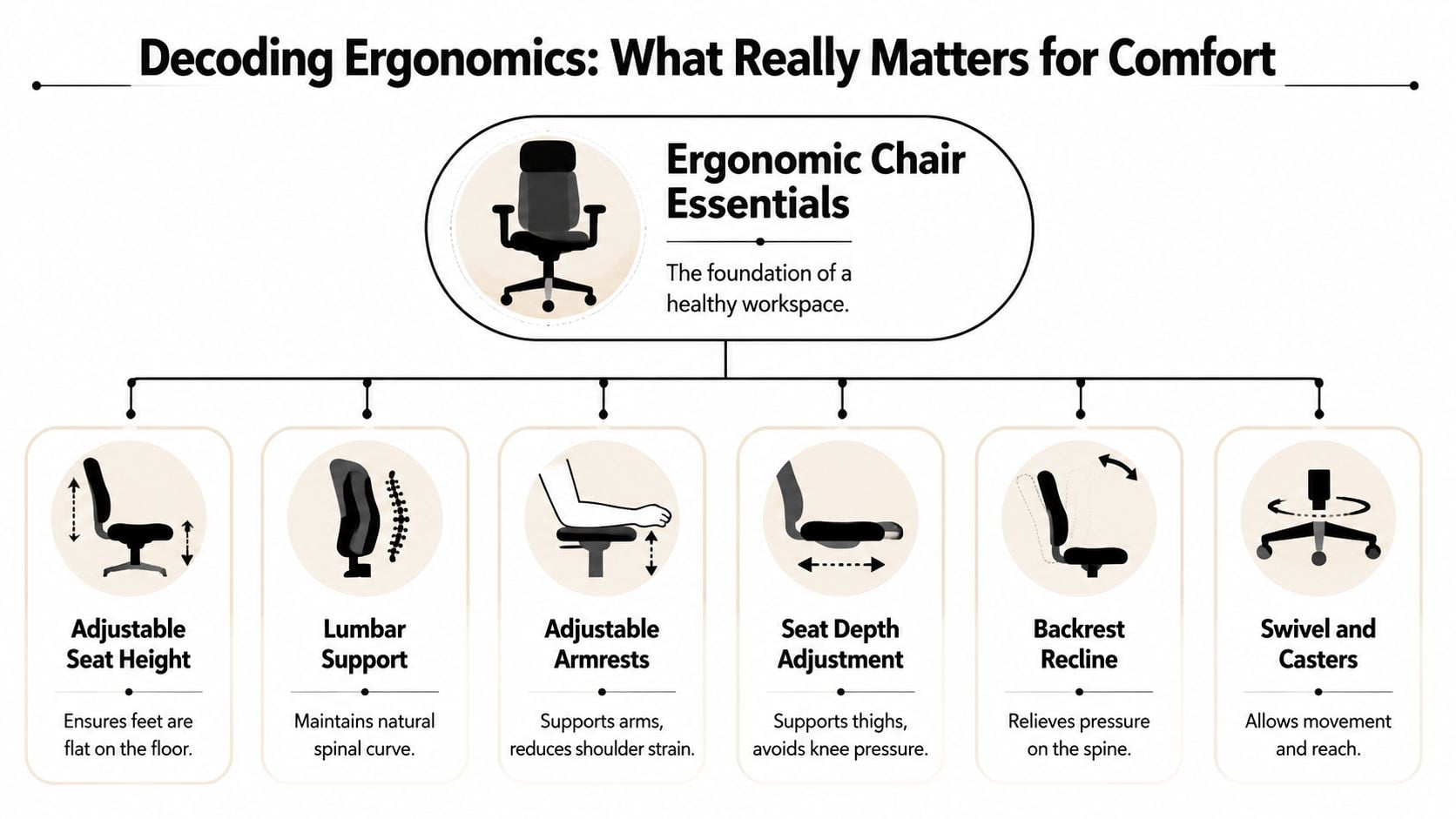
The features that matter most
Here’s the plain-language version of what to look for.
Lumbar support
Think of this as a gentle hand at your lower back. It helps maintain the natural curve of your spine so you’re not slumping by lunchtime.Seat height adjustment
Your feet should rest flat on the floor or on a footrest. If the seat is too high, pressure builds under your thighs. If it’s too low, your knees rise awkwardly.Adjustable armrests
Your arms shouldn’t hang in space while you type. Good armrests help your shoulders relax instead of tightening up toward your ears.Seat depth adjustment
This changes how far the seat extends under your legs. Too deep, and the front edge presses behind your knees. Too shallow, and your thighs don’t get enough support.Backrest recline and tilt
A chair should move with you. A little recline can reduce pressure and help you avoid sitting bolt upright all day.Swivel and casters
Small movements matter. Reaching for a file or turning toward a second screen is easier when the chair moves smoothly.
Why adjustment matters more than softness
People often assume a softer chair is always more comfortable. Sometimes it is, for a short sit. For a long workday, support usually matters more than plushness.
A properly fitted chair can make a measurable difference. A 2022 Cornell University Ergonomics Lab report found that properly adjusted ergonomic seating can reduce lower back pain by up to 54% among workers who sit for over 6 hours daily, as noted in the earlier research source. That’s a strong reminder that setup matters just as much as the chair itself.
Practical rule: If a chair can’t adjust to your height, arm position, and sitting depth, it’s asking your body to do the adjusting.
If you want to go deeper on support-focused models, our guide to ergonomic office chairs for back pain is a helpful next step.
A quick way to judge a chair
If you’re comparing several options, use this simple checklist:
| What you check | What you want to feel |
|---|---|
| Lower back | Supported, not pushed too far forward |
| Seat edge | No hard pressure behind the knees |
| Arms | Shoulders relaxed while typing |
| Recline | Smooth movement, not a sudden drop |
| Overall fit | You sit back naturally without perching |
If posture has already become a daily issue, these workplace ergonomics programs offer useful guidance on how seating, desk height, and habits work together.
Mesh, fabric, and leather all have their place too. Mesh tends to feel airy and light. Fabric often feels warmer and more familiar. Leather can look sharp in the right room, though some home offices prefer a softer visual feel. The key isn’t picking the “fanciest” material. It’s choosing one that fits your body, your room, and how long you sit.
How to Choose a Chair Based on Your Body and Work Habits
The “best” chair isn’t one chair. It’s the chair that fits your build, your desk, and the way you work.
Some people sit for long stretches doing focused screen work. Others move in and out all day, taking calls, writing quick notes, and standing often. Those are different jobs, and they call for different seating priorities.
Start with your body
A chair that feels fine to one person can feel off to another in seconds.
Consider these fit questions:
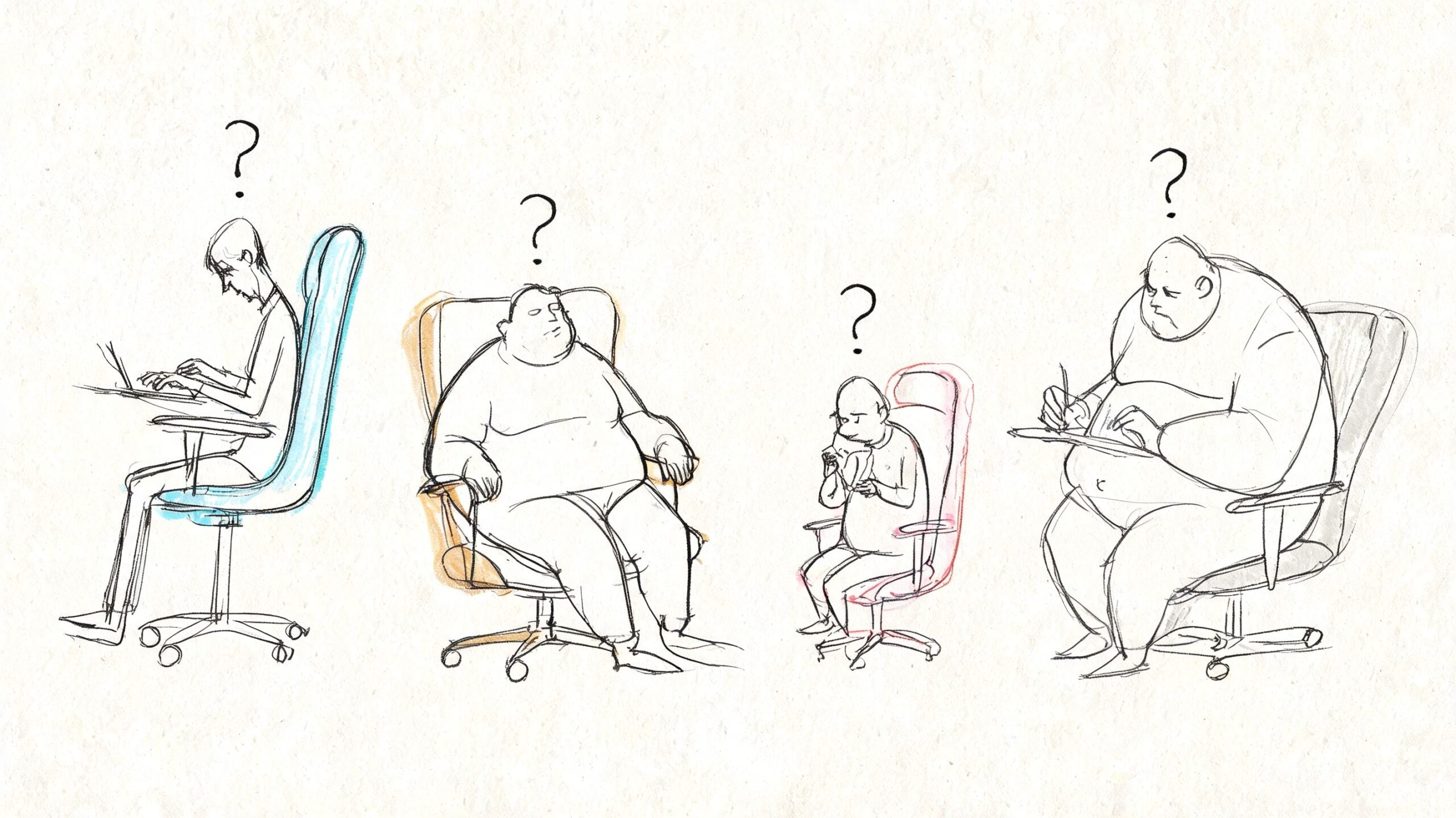
- Are you tall? Look closely at seat depth and back height. Taller users usually need more thigh support and a back that doesn’t stop too low.
- Are you petite? Make sure the seat can come low enough and the seat depth doesn’t force you to sit on the edge.
- Do you have shoulder tension? Prioritize armrests that move enough to meet your elbows where they naturally fall.
- Does your lower back get tired first? Pay more attention to lumbar shape and backrest contact than to thick cushioning.
Then think about your work pattern
Your routine matters as much as your measurements.
If your day involves long stretches of concentrated work, look for a chair with easy adjustments and a stable sitting position. If you lean back while reading, reviewing, or talking on video calls, a smoother recline becomes more important. If the chair sits in a shared room or bedroom office, size and style may matter almost as much as features.
The right chair should feel like it belongs to your body within a few minutes, not after weeks of “getting used to it.”
In-person testing is helpful. Online photos can’t tell you whether the seat edge hits your legs in the wrong spot or whether the lumbar support lands too high. Before buying, it also helps to review room dimensions so the chair fits the whole setup, not just your back. Our guide on how to measure furniture can help with that.
A few examples people relate to
- A homeowner using a spare bedroom as an office may want a chair that blends into the room and still supports long work sessions.
- A remote employee on video calls most of the day may care about upright posture, arm support, and a polished look.
- A small business owner working from a home office may need something durable enough to handle daily use without looking too corporate.
That’s also where customization becomes useful. Some shoppers want a cleaner fabric, a specific finish, or a feel that coordinates with the rest of the home. Flexsteel is one example of a brand known for quality-focused furniture options, and that kind of made-for-you thinking often matters more than chasing a trendy chair online.
Understanding Your Budget and Finding Lasting Value
Budget matters. It always does. The key is to think in terms of value over time, not just the sticker you see on day one.
A low-priced chair can be the right short-term solution in some homes. But if you sit in it every workday, durability starts to matter fast. Wobbly arms, flattened cushions, worn fabric, and rough casters aren’t just annoying. They change how the chair supports you.
What value really looks like
When people compare chairs, I encourage them to look at four things together:
- Adjustment range so the chair can fit the user properly
- Build quality in the frame, base, casters, and mechanisms
- Warranty length because that often reflects the maker’s confidence
- Service after the sale in case something needs attention later
A useful reminder comes from the market side of the business. A 2026 International Furniture Industry report found that 28% of lower-cost chairs fail within 3 years in home offices due to wear, which is why many shoppers look harder at durable models with longer warranties, as discussed in FlexiSpot’s ergonomic chair category context.
A simple way to compare tiers
| Tier | What you often get | Best for |
|---|---|---|
| Entry level | Basic adjustments, simpler materials | Shorter sessions, lighter use |
| Mid range | Better fit options, stronger mechanisms, nicer materials | Daily home office use |
| Premium | Broader adjustability, refined comfort, stronger long-term build | Full workweeks and long-term investment |
That doesn’t mean everyone needs the premium chair. It means you should match the chair to the job.
Paying less up front can cost more later if the chair stops supporting you well or needs to be replaced too soon.
For families balancing comfort with monthly cash flow, flexible payment options can make a better-built chair more realistic. If that’s part of your decision, our page on furniture financing options explains how to spread out a larger purchase.
The same logic applies across the house, really. People shopping Bellefontaine furniture, custom sofas Ohio families can tailor, or even a mattress store Logan County residents trust usually ask the same question: will this hold up, and will it still work for my life a few years from now? A home office chair deserves that same level of thought.
Perfecting Your Setup for a Pain-Free Workday
Even a well-made chair won’t help much if it’s adjusted poorly. Many people get frustrated. They buy a better chair, sit down, and expect instant relief without changing anything.
Most chairs need a few small adjustments before they feel right.
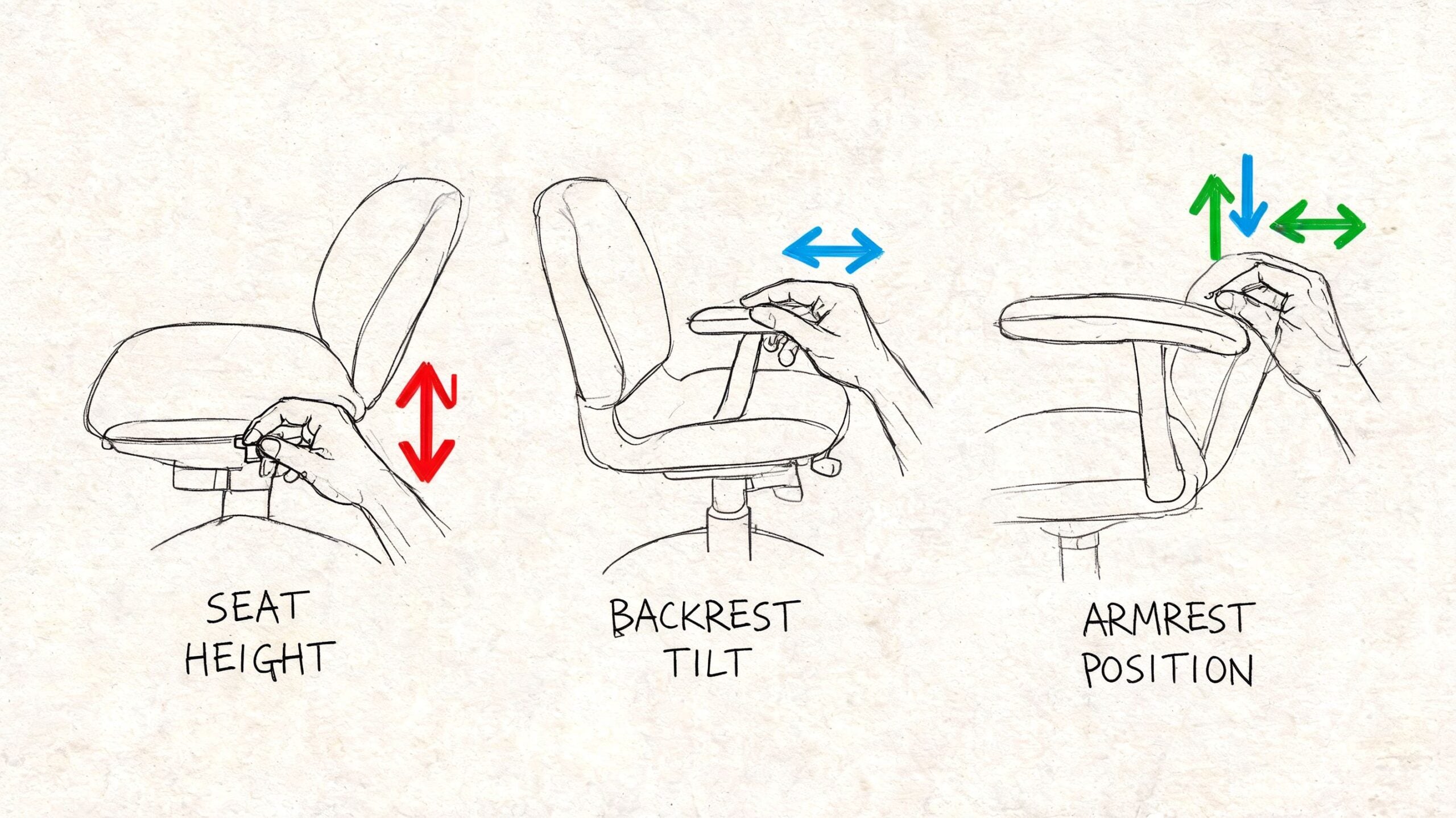
A simple setup checklist
Use this in order:
Set the seat height first
Your feet should rest flat. If they don’t, adjust the chair before touching anything else.Sit all the way back
Your lower back should meet the backrest instead of floating away from it.Check the seat depth
You want support under your thighs without the front edge digging in behind your knees.Raise or lower the armrests
Your elbows should rest comfortably without lifting your shoulders.Adjust recline and tilt tension
The chair should support movement, not feel stiff or like it’s throwing you backward.
Match the chair to the desk
A lot of “chair discomfort” is really a desk-height problem. If the desk is too high, you’ll shrug your shoulders all day. If it’s too low, you’ll round forward.
That’s why the whole workspace matters. If you’re reworking the room, these office furniture layout ideas can help you think through desk placement, reach zones, and walking space around the chair.
Sit back first, then bring the work to you. Don’t lean forward all day to meet the desk.
For extra reading on posture habits at home, this guide to spinal alignment health gives a helpful overview in plain language.
Don’t forget movement
An ergonomic chair supports movement. It doesn’t replace it.
Shift position during the day. Recline a bit when reading. Stand for a short stretch between tasks. The goal isn’t to freeze in a perfect posture. The goal is to make good posture easier and bad posture less likely.
Professional delivery and setup can help here too. A chair that arrives assembled and positioned correctly saves you from guessing which lever does what before your next meeting starts.
Ergonomic Solutions for Bellefontaine Businesses
A small office can run into the same seating problems as a home office, just multiplied across more people, more desks, and more hours of use. In Bellefontaine and across Logan County, business owners often notice it during a remodel, an office move, or a season of hiring. The desks are in place, the computers are ready, and then the weak spot shows up. Someone spends a full day in an aging chair and feels it in their back, shoulders, or hips before the workday ends.

For a business, a chair is part of the work system. If the support is poor, people shift, perch, and tire out sooner. If the chair fits well, it works like a good pair of shoes. You stop thinking about it and get on with the day.
Why businesses should care
Good task seating helps in practical, visible ways:
- Employee comfort improves when chairs can fit different body types instead of forcing everyone into one posture.
- Workstation consistency gets easier when chairs have adjustment ranges employees can use.
- Professional appearance matters in conference rooms, private offices, shared desks, and reception areas.
- Long-term durability matters more in a business setting because chairs are used hard and used daily.
There is also a management side to it. A chair that adjusts well is easier to assign, easier to reset for the next user, and easier to keep in service over time. That matters for small businesses where one purchase often has to do several jobs at once.
What a local business setup often needs
A law office may want refined seating for private offices and guest chairs that look polished without feeling stiff. A clinic or school office may need practical seating that is easy to clean and easy to adjust. A team workspace may need several task chairs that feel consistent from desk to desk so employees are not relearning their setup every time they switch stations.
Good planning pulls those pieces together. The goal is not to buy matching chairs just because they match. The goal is to choose seating that suits the work being done, the people using it, and the look of the space.
Tanger’s Furniture offers a Commercial Office option that covers home-office scale needs as well as small-to-medium workplace projects.
A business chair should fit the worker, the workstation, and the workday. If one of those is off, people feel it.
That local fitting process is what many online roundups miss. A residential customer might need one chair that feels right for long solo work. A small business owner may need five, ten, or twenty chairs that fit different employees without turning the office into a mix of random seat heights, arm styles, and support levels. Trying options in person and talking through the work setting often leads to a better result than choosing only by specs on a screen.
It also helps businesses that split time between office and home. The chairs do not need to be identical in every location. They should create a similar level of support so employees are not comfortable at one desk and struggling at the next.
Find Your Perfect Fit at Tanger’s Furniture
You sit down in a chair that looked great online. Ten minutes later, the seat feels a little too deep, your shoulders creep up, and your lower back never quite settles in. That is the kind of problem a spec sheet rarely catches.
Reviews and measurements still have value. But an ergonomic chair works a lot like a good pair of shoes. You can read about support, materials, and construction all day, yet your body usually knows the answer once you try it.
That hands-on test matters for home offices and for small Logan County businesses buying more than one chair. A homeowner may need one chair that supports long, quiet work sessions. A business owner may need several chairs that fit different people while keeping the office consistent and professional. Seeing the options in person helps both groups make clearer decisions.
What to look for when you shop in person
A quick sit is not enough. Give each chair a fair test, the same way you would test drive a car on more than one street.
Use this simple in-store routine:
- Sit all the way back and feel for gentle support in your lower back.
- Place your arms as if you are typing and notice whether your shoulders drop naturally instead of tensing up.
- Lean back a little and check whether the chair follows your movement without feeling loose or stiff.
- Feel the front edge of the seat to make sure it does not press into the area behind your knees.
- Try more than one style so the differences in support, height, and seat shape are easier to notice.
If you are unsure what feels "right," pay attention to what your body does on its own. A good fit makes it easier to sit upright without effort. A poor fit asks your muscles to keep correcting the chair.
Think beyond the office corner
A home office is still part of your home, and a business office still has to feel pulled together for staff and visitors. The chair needs to support your body, but it also has to make sense in the room.
That is when broader furnishing decisions come into play. Some shoppers are comparing finishes for nearby living spaces, browsing Smith Brothers of Berne for custom upholstery ideas, replacing laundry appliances with Speed Queen laundry options, or shopping a mattress store Logan County families rely on when comfort becomes a whole-home priority. The goal is simple. Choose pieces that work well individually and feel right together.
The local difference
Working with a local store makes the process simpler. You can ask questions, compare adjustments side by side, and get guidance from someone who sees how the chair fits your height, posture, and daily routine. That kind of fitting process is hard to replace with photos and filters.
It also helps after the purchase. Delivery, setup, and service all affect the experience. If something needs attention later, having a nearby team is easier than trying to sort out a chair problem through a long online return process.
Price matters, too. Value is not just the ticket number. It is how long the chair stays comfortable, how well it adjusts, and whether it keeps doing its job month after month. If you are furnishing a home workspace or a small office, payment options can also make it easier to choose a chair that lasts instead of settling for one that only looks good on day one.
If you are comparing the best ergonomic chairs for home office use, slow the process down. Sit in a few. Ask someone to watch your posture. Test the adjustments. In a showroom, that fitting process becomes much more practical, and it often leads to a chair that helps you feel better and work better long after the first week.